Early Access: ODS 360/ Domemaster3D/ Cylinder, Cryptomatte, Movie Render Graph, Seamless Bloom in Renders plus much more
A major new Early Access release is now available to download for Unreal 5.6-5.8 (plugin versions: 378.63, 403.27, 430.0).
Early Access

To download the release, join our Early Access program:
Go to your account page and click to subscribe to
Early Access.Then go to our Download Center and you will see the Alpha versions of the plugin.
If you don’t see the plugin, please make sure you are logged in and hard refresh.
Omni Directional Stereo (ODS)

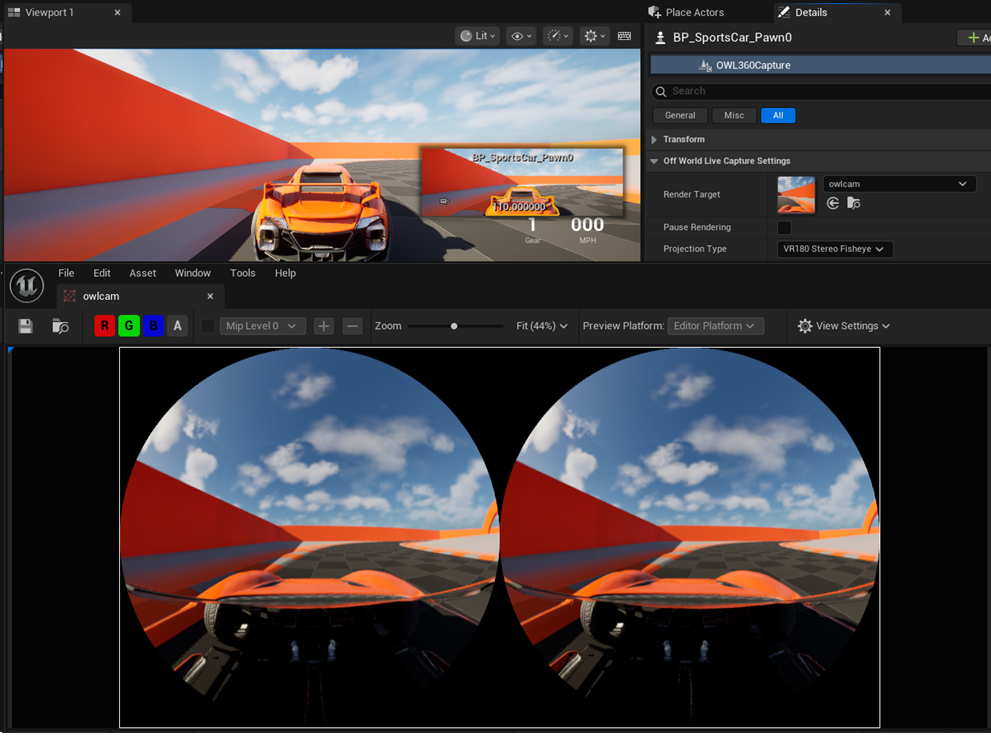
We now support ODS (Omnidirectional Stereo) outputs for
VR (Stereo 360),
Dome (Domemaster 3D ODS); and
Cylindrical projections.
Overview:
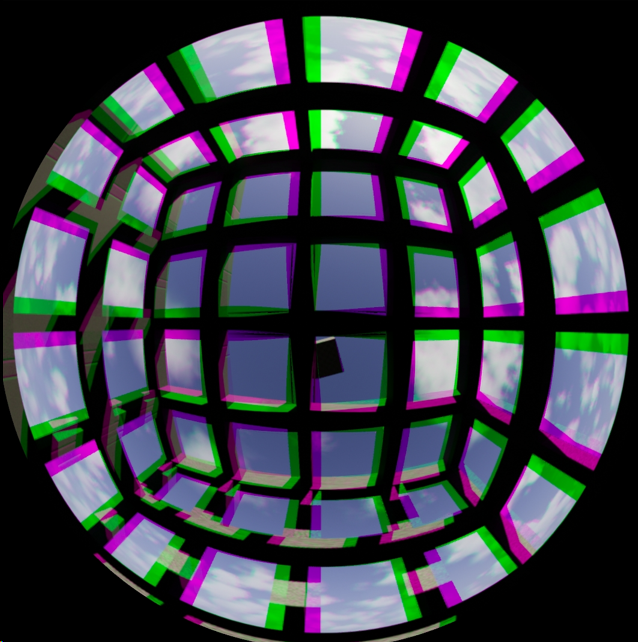
ODS allows for seamless 360 degree stereoscopic projections as you can see in the anaglyph of a 360 stereo equirectangular frame above.
It uses capture rigs of multiple cameras from which both the pixels for left and right eyes are sampled.
This provides continuous, clean stereoscopic imagery for the complete sweep of 360 degrees.
Both poles converge to monoscopic to avoid negative viewer experience, at an angle adjustable by the user.
There is a new set of
Parallax Guideswhich show in the live Render Target to guide on:Objects to close to viewer
Objects at focus distance (with picker to set distance to exact content point where parallax should end).
Objects beyond focus distance
Objects on surface of Dome (Domesmaster 3D only).
Domemaster 3D includes
Dome Tilt,Zero Parallax Radius,Zenith Separation FalloffandAnaglyphmode for previz.Cylindrical ODS includes
AngularandPerspectiveoptions, the latter used for direct projections to LED walls.
Things to know:
The ODS projection works both in the 360 Camera actor (Render Target) and Movie Render Queue/ Graph.
It consumes much more VRAM (3x) than the cube based projections because it has to capture a lot more cameras so is only suitable for previsualisation, not live-streaming.
You can use the
Pause Rendering/Capture on Movementsettings to manage performance while working with the projection in Editor.In Movie Render Queue/ Graph, there is a new setting in High Resolution Rendering called ‘Generate’, which appears only for ODS projections.
You can chose to generate a job per eye (with stitching) or per pane (each of the cameras that are used for the projection are rendered separately and then stitched together).
For renders above
4-6Kyou should use these settings to manage VRAM usage.Render times will be longer for ODS, both due to the higher resolution/ aspect ratio and the fact that more cameras are being captured.
Niagara and Skeletal meshes currently have some artefacts in ODS projections. We hope to resolve these before the full release.
Cryptomatte

Cryptomatte is now supported for all output projections, including tiled high resolution renders and ODS projections:
The implementation matches Unreal’s cryptomatte exactly and is directly compatible with Nuke, DaVinci, After Effects etc.
You can add the
OWL 180/ 360 Object Idsrender pass in Movie Render Queue or Movie Render Graph and set the objects direct in the pass.
Things to note:
.Exr file format is required.
When using tiled or split pane (ODS) renders the render jobs will be automatically generated by the OWL pass.
Cryptomatte is Pro 360 Camera license only.
Cryptomatte will only work with new renders because previous renders had a pixel offset which will misalign them to the Matte.
The option
Centered Stitch Grid(on by default) ensures that beauty passes and the cryptomatte are precisely pixel-aligned.
Movie Render Graph

You can now initiate and manage OWL renders through Movie Render Graph:
You can add nodes for all OWL capabilities: main pass, Object Ids, tiling and stitch pass.
All the same render capabilities are supported in both.
Things to note:
You must set the output resolution for your render in the
Global Output Settingsnode instead of the OWL render pass like in Movie Render Queue. A warning will pop up if the aspect ratio you have selected is incorrect for the projection you have selected.If you are using tiling then you need to add all your settings before clicking the ‘Generate Jobs’ option.
Currently ODS supports only Render per Pane in MRQ, tiling is only supported in MRQ, but will be added for the full release.
Seamless Bloom in MRQ/ MRG

Our patented seamless Bloom algorithm can now be used in Movie Render Queue/ Graph:
It has been refactored to be composited into the render after the Tonemapping part of the render pipeline to retain color accuracy with Unreal’s final output.
The new Bloom can be enabled in the 360 Camera Actor in the
Post Process Pipelinesection underPipeline>Seamless 360 Bloom.You also need to update the
Bloomvalue above0in thePost Processsettings of the 360 Camera.In Movie Render Queue/ Graph there is a new
Bloomsection where you can add the Bloom direct to your render either directly or as a separate .exr layer to use when compositing.N.B. the
Seamless 360 Bloomoption must be enabled in the 360 Camera Actor for the render pass to work.
Other Updates
In Movie Render Queue/ Graph:
The
Interpolation Typeoption has been updated to includeBicubicandTrilinearsampling.Trilinear sampling is recommended although it can slightly increase render times.
Trilinear enables downsampling of tiled renders in a Stitch pass to a new resolution with pixel accuracy, either to produce lower resolution outputs or to gain additional detail to renders through downsampling.
Scene View State CPU Transferis added which allows for memory to be offloaded to the CPU preserving VRAM.This setting only shows benefits when used with
Anti-Aliasingset toNoneandSpatial/ Temporal samplesadded manually.In this configuration it can be possible to render Equirectangular 180 at
12Kx12Kwithout tiling to preserve fully dynamic scene elements.The cost of this is much longer render times due to the CPU transfer.
In tiling,
owliintermediate files have a new compression and layout algorithm so intermediate files take up significantly less disk space.Anti-aliasing without TSR updated to support spatial sample jitter.